The home page keeps to the three things that matter most. This page has the rest: the firm workspace, how capture works, Polish, calendar and mail suggestions, unbilled work, trust accounting, the invoices, the year view, the desk, the themes, and how your data is handled.
Invite your colleagues, capture against shared clients and matters, and review each other's time before it bills. On billing day, one pass creates a consolidated invoice for every client, and the firm emails each bill straight from the app.
$9.99 per seat per month · 7-day free trial · non-billing administrators are free
Create your firm in the app’s Settings, invite by email, and your colleagues are capturing in minutes.


Tap a tenth, run the timer, or type a line the moment work ends. Or talk the way you'd brief an assistant ("Johnson, one point seven, consultation re settlement agreement") and Chain Dictation lines up several entries at once.
The AI reads your words like a colleague would and fills in the client, the hours, the date, and a clean narrative. Nothing saves until you've looked it over and approved it. Your phone's own speech recognition does the listening; audio never leaves your device. To structure an entry, the dictated text is sent along with your client and matter names so it can match them.
Pick a period and export Word, PDF, Excel, or plain text in your invoice style. Or bill everyone at once: one pass makes a numbered invoice for every client with unbilled work. On iPhone the share sheet opens with the files already attached; choose Mail, Gmail, or Outlook and send.
You wrote "Worked on the motion for summary judgment, and kept revising the statement of undisputed facts. Also emailed the paralegal about exhibits." Tap Polish and the AI rewrites it the way a seasoned biller would: Draft Motion for Summary Judgment; revise statement of undisputed facts; correspondence to paralegal re exhibits.
It knows the conventions clients expect on a legal bill: semicolons between tasks, "correspondence" instead of "email," a call is a "conference," and your dates kept exactly as you said them.
Link your Outlook and OnPoint drafts entries from any day you pick: meetings from your calendar, threads from your mail, each with the date, a duration, and the client already matched. Save the ones that are right, edit the ones that are close, dismiss the rest. A day you forgot to capture comes back in about a minute.
The Invoices tab totals your unbilled work since each client's last invoice. "You're sitting on $6,724" is the kind of number that gets bills out the door. Overdue invoices sort themselves to the top with a red badge and a Remind button that drafts a courteous nudge for you.
When it's time to bill, one tap takes care of all of it: OnPoint builds a numbered invoice for every client with unbilled work, saves each one to your records, and hands you the files.
Or skip the taps entirely: tell the assistant "Send XYZ's bill as a PDF." It shows you the period, the hours, and the dollars first, and nothing sends without your yes. Then it opens the share sheet with the file attached.
Every client gets a trust ledger, and every matter within a client gets its own. You record retainers coming in, payments going out, and the amounts applied to bills. Each amount is stored to the cent. OnPoint will not accept a transaction that would put a ledger below zero on any date, so one client's money can never be used for another client's matter.
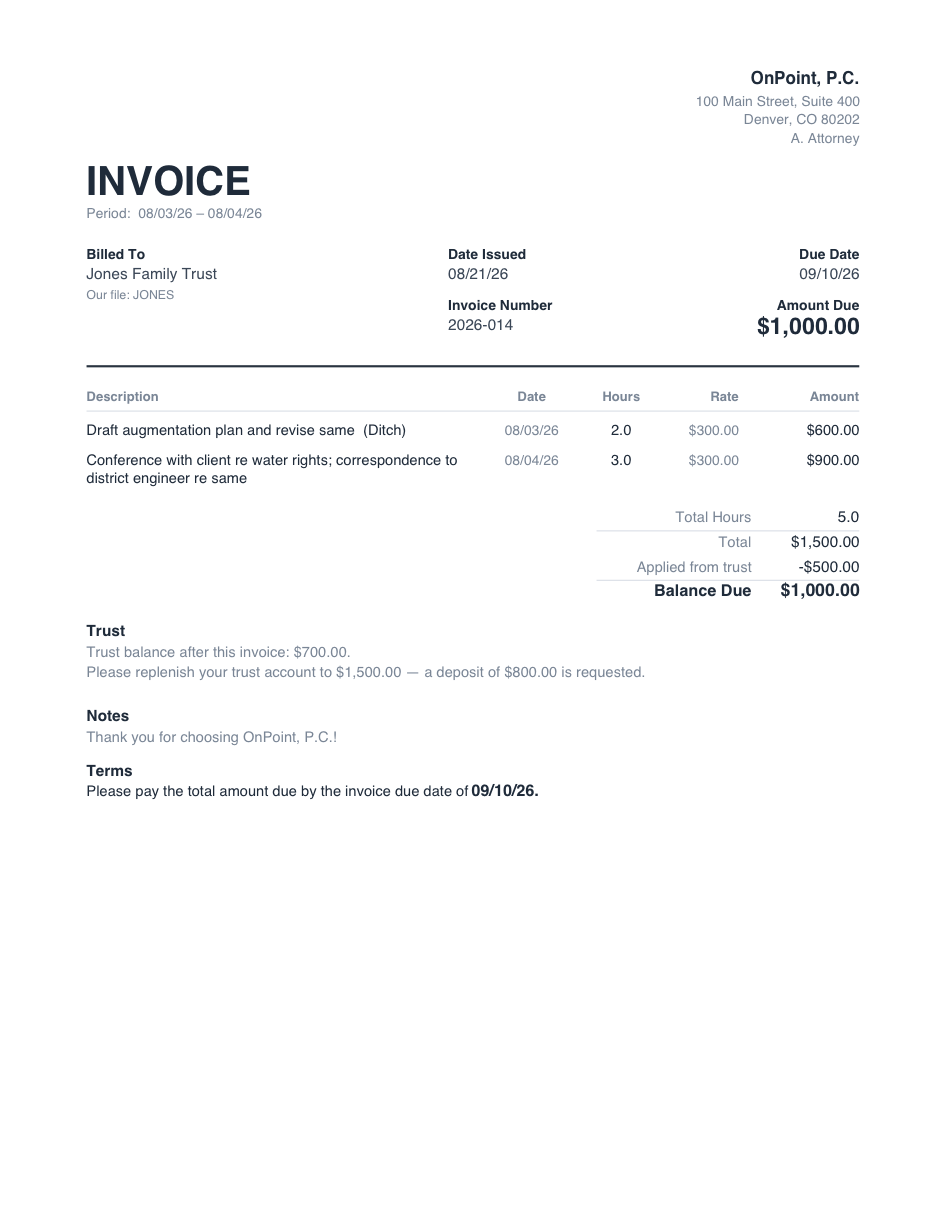
Bills show the trust activity: the amount applied from the retainer, the trust balance after that, and, if you have set a target for the client, a request to bring the balance back up to it. This prints on Word, PDF, Excel, and the text version, in both invoice styles.
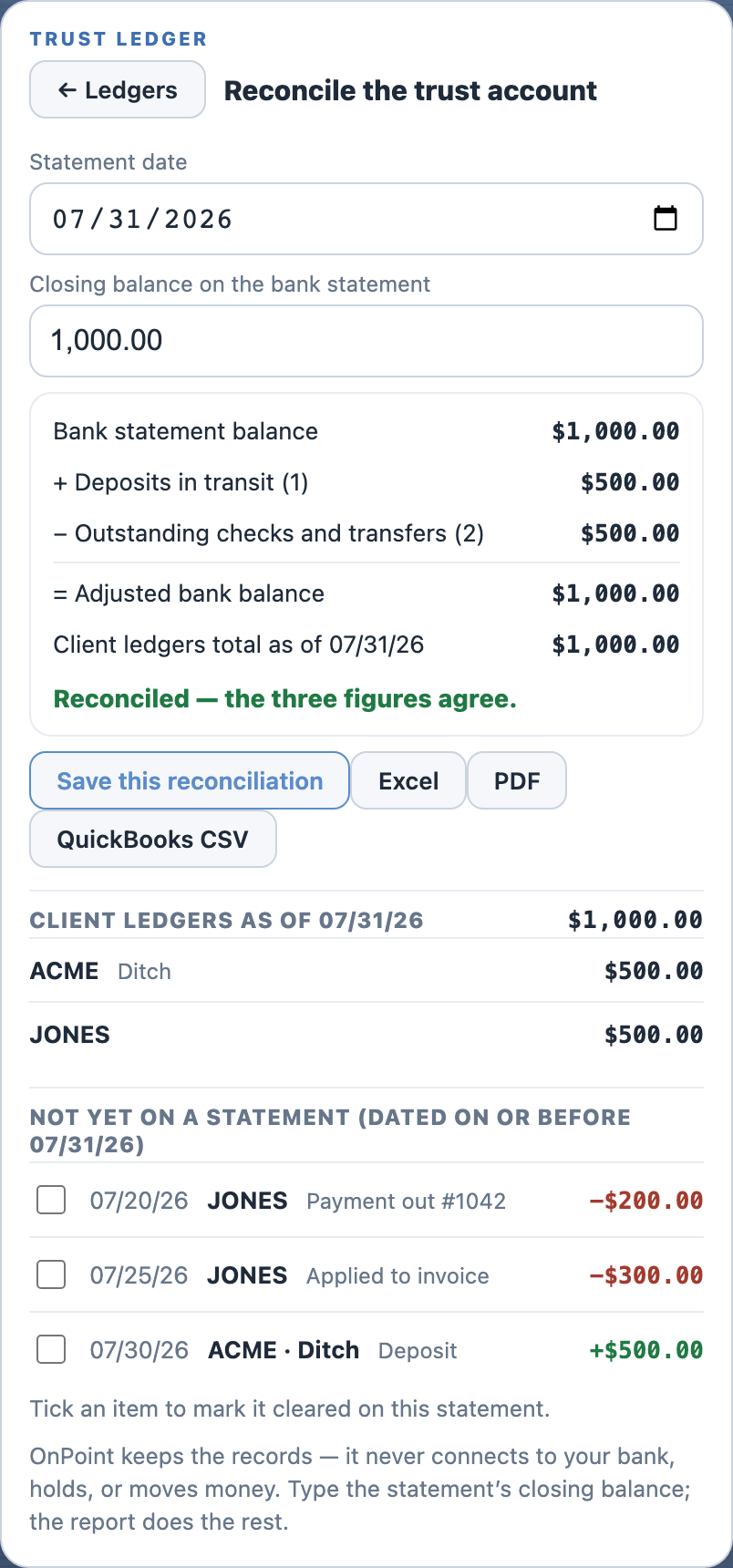
To reconcile, enter the closing balance from the bank statement. OnPoint shows the statement balance, the deposits and checks that have not cleared yet, and the total of the client ledgers, and tells you whether they agree or by how much they differ. Mark the items that cleared, save the reconciliation as a record, and export it to Excel or PDF. A QuickBooks CSV is included that posts trust transactions to a liability account, not to income.
OnPoint keeps the records. It does not connect to your bank and does not hold or move money. In a firm, the trust ledger belongs to the firm: administrators and reviewers record and reconcile it, and every change is logged with the name of the person who made it.
Two styles, and every export follows the one you pick. Letterhead is the classic: your logo and firm block up top, black on white, the way bills have always looked. Modern puts the amount and due date up front, with your logo in the corner and fees and costs totaled below. Word, PDF, and Excel alike.
Pay online, through your own link. Paste the payment page you already use (LawPay, a Stripe payment link, your bank's portal) into Settings once, and every bill carries a clickable "Pay online" line: both styles, PDF and Word, Excel, even the plain-text bill. OnPoint prints your link and your client pays you there. The money never passes through us.
And the whole run is one pass. Batch billing builds a numbered invoice for every client with unbilled work: files ready to send, records saved, nothing retyped. Firms go one further and email each client's bill straight from the app; every address is shown before anything sends, and no bill can go out twice by accident.
Both are actual OnPoint exports, untouched. A multi-client range exports one file per client, each with its own invoice number, plus an Excel workbook and a plain-text block for your billing system. If a carrier requires LEDES 1998B, OnPoint produces the file. A QuickBooks CSV is available too. On iPhone, the share sheet opens with the files attached.
Set a daily goal and the Summary keeps score: today against the goal, the week as bars, the year as a grid of months that turn gold when you hit it. Clear a day and the app quietly celebrates; string a few together and it counts the streak.
It also projects where the year lands at your current pace, so you know in August whether you're on track.
Open onpointtimeentry.com in any browser and OnPoint becomes desk software: capture on the left, your day as a real table on the right, week and month boards, and a Summary that tracks your goal all the way to the year. Nothing to install, and every entry is already on your phone.
Professional for the office, pastel for a softer desk, beach for daylight, dark for late nights, stealth for keeping a low profile. The theme is for your screen, never the client's: exported bills stay black on white, in whichever invoice style you chose.
OnPoint keeps your entries on your device. The app works fully offline, and when you sign in they sync privately to your own account, so a lost phone never means lost work. Dictation is handled by your phone's own speech recognition: OnPoint never records, stores, or transmits audio.
The AI features send only the text you dictate or type, together with your client and matter names so it can match them. The app shows no ads. It measures what happens — an entry saved, a bill exported — never what you wrote, and your work is never sold or shared. You can put the whole app behind Face ID.
Read the privacy policy. The plain-English version is at the top.